



Have you ever wondered why people do the things they do? The many answers to that question form an extensive and exciting labyrinth, and we welcome you to join our diverse department of students, staff, and faculty in exploring it. If you enjoy asking questions and pursuing dynamic student projects, you will find some of your most rewarding experiences in our department at the University of Prince Edward Island.
Psychology is among the most expansive fields for human inquiry, ranging from what makes us human to what holds us in common with other species, through examinations of mind, emotions, and behaviours. Virtually no aspect of being human is left unexplored by our diverse faculty, including how our evolutionary roots influence our humanity and what a difference consciousness and mind can make to our understanding. We have dynamic research and teaching programmes supported by our broad traditions within behavioural neuroscience, perception and cognition, critical and historical perspectives, and developmental, humanistic, clinical, & applied psychologies. Students benefit not only in the classroom but also through opportunities to work in research settings with faculty in each of these areas. World class researchers and award winning scholars in the classroom create connections with students that are unique to a small university. Our department has a strong core of quantitative training and has developed an equally impressive qualitative component. Students in our programme benefit from training in both of these areas to add to their skill set and the ability to ask and answer meaningful questions.
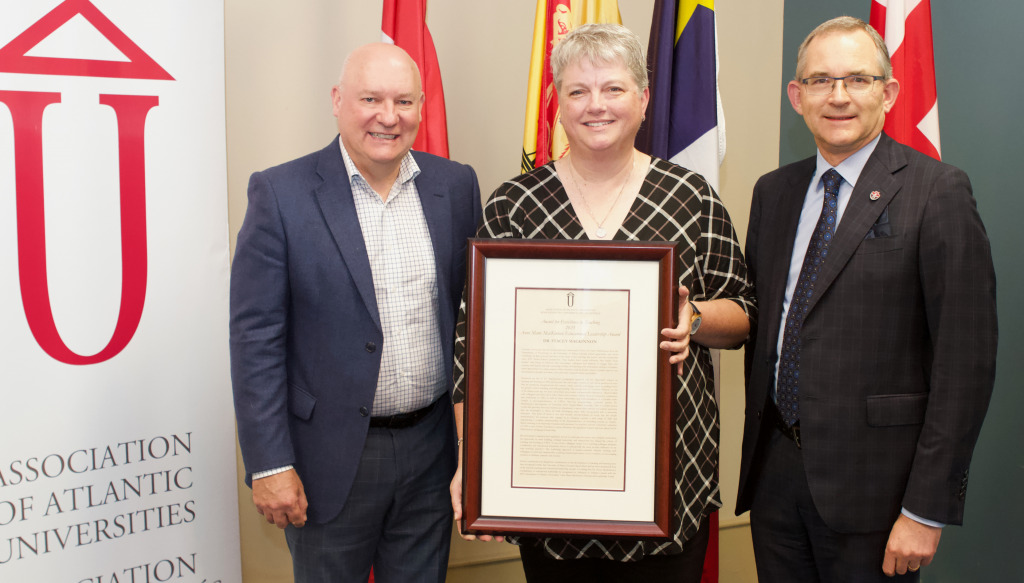
Dr. Stacey MacKinnon, an associate professor of psychology at the University of Prince Edward Island, was presented with the Association of Atlantic Universities’ (AAU) 2023 Anne Marie MacKinnon Educational Leadership Award at the AAU’s fall meeting on September 20.
Our inspiring multi-award winning faculty commit to student engagement through a variety of pedagogical approaches in smaller classrooms and larger ones alike. Our students strengthen their ability to work critically and creatively, to follow their curiosity with systematic rigour, and to find effective and authentic ways to communicate about their knowledge. Independent as well as collaborative scholarship is strengthened throughout the curriculum, and especially during Honours projects. We strongly encourage a liberal education across a range of elective courses in the sciences and the arts so that students become part of an engaged citizenry. Some faculty’s focus includes academic activism and they create opportunities for social justice connections with our community. We endeavour to create a community of scholarship both within the department and with the broader university and community through interactive class projects, service learning, community discussions, formal presentations, and informal gatherings.
Our diverse foundational BA or BSC programmes contribute to students’ careers in various ways. Our students not only acquire skills but they also have opportunities to practice them in the smaller classroom environments and to gain greater confidence in their abilities. Many students successfully launch into relevant professional programmes while others continue to thrive in their graduate studies in psychology itself.
Students benefit from our welcoming and friendly atmosphere in the department which is made possible by our dedicated, award winning support staff. Importantly, our students collaborate to make their experiences at UPEI even more fulfilling through the active Psychology Arts and Sciences Society (PASS). A student in our department becomes part of a community of scholarship.
Your commitment to your studies in psychology will be enriching to you personally but it will also hold possibilities for you to expand your relationships and your role in the broader community. Your studies will be challenging, demanding you expand your world view and also your potential role as an active engaged citizen. Your journey holds rich possibilities and we invite you to explore what it means to be human at this place and time on the planet with us here at the University of Prince Edward Island.
Need more information about Psychology?
The personal information requested on this form is collected under Section 31(c) of the PEI Freedom of Information and Protection of Privacy Act. Read our Disclaimer.
Note: Current UPEI students should refer to Student Planning in myUPEI and the UPEI Academic Calendar governing their entry year, and speak to an academic advisor about course requirements. The course structure presented for this program is a recommended, unofficial progression for prospective students.
Note: As per Academic Regulation 1h, all undergraduate degree programs require successful completion of IKE-1040 and a Writing Intensive Course.
Course Requirements
Nineteen (19) semester courses (57 semester hours) in Psychology which must include Psychology 1010-1020, Psychology 2780-2790, Psychology 4810, Psychology 4800 (Honours Literature Review) and Psychology 4900 (Honours Thesis). Students pursuing a Bachelor of Arts degree with Honours in Psychology must complete all of the requirements for a BA with a major in Psychology. Students pursuing a Bachelor of Science degree with Honours in Psychology must complete all of the requirements for a BSc with a major in Psychology. To graduate with an Honours degree requires a total of 42 semester courses (126 semester hours).
The Honours Thesis
The Honours Thesis will consist of a paper written in the format specified by the Canadian Psychological Association. Most theses report on a supervised independent research project (quantitative and/or qualitative), but other alternatives include: (a) a review paper that includes an original historical and theoretical overview of the topic, or (b) a critique of the theory, research, or practice of psychology. The thesis is evaluated by a committee of at least three faculty members including the student’s supervisor. There is an oral defence of the thesis.
Admission Requirements
- Student must be a Psychology major, and must have met (or will be meeting in the upcoming academic year) all of the requirements for either a BA or BSc in Psychology.
- A full-time Psychology faculty member who is willing to supervise your Honours thesis.
- A completed pre-Honours application submitted with a copy of your official academic transcript.
- An overall academic average of 75% or above, and an overall Psychology course average of 80% or above. You must maintain averages above these minimal criteria to remain in the programme.
- The Honours program entails completion of Psychology 4800 (Honours Literature Review), Psychology 4900 (Honours Research), and Psychology 4810 (Origins and Contexts of Psychological Thought and Practice). Your supervisor will outline the specific requirements for Psychology 4800 and 4900 as they pertain to your thesis.
Visit the Psychology Honours Program page
Requirements for a Major in Psychology
Students may declare a major in Psychology at any time. Majors are expected to take five required courses, Psychology 1010-1020, Psychology 2700, Psychology 2730, and Psychology 2750, in their first two years. A formal review of each student’s performance is conducted upon completion of the five core courses. Continuation of the program will be based upon a 70% average with no mark below 60% in the five core courses.
Psychology majors are encouraged to complete one or more of the following first-year experience courses: English 1010 (Academic Writing), UPEI 1020 (Inquiry Studies), and UPEI 1030 (University Studies). Each course develops distinct skills that help prepare students for the academic demands of studying psychology.
Update to the second-year core course requirements
As of the 2023–2024 Academic Calendar, there is a change in the second-year methods courses required for majors. Previously, students were required to take PSY 2780 and 2790. For students who begin their studies in Fall 2023 and later, they will be required to take PSY 2700, 2730, and 2750 instead. PSY 2700, 2730, and 2750 will not be timetabled until the 2024-2025 school year, allowing for a transition year for students enrolled ahead of these changes to fulfill their core course requirements with the prior requirements.
After this transition year, if a student has partially completed the core course requirements, course credit will be granted as follows:
- Completion of PSY 2780 only – Granted credit for PSY 2730; will still need to take PSY 2700 and 2750.
- Completion of PSY 2790 only – Granted credit for PSY 2750; will still need to take PSY 2700 and 2730.
Bachelor of Arts
Students pursuing a Bachelor of Arts degree with a major in Psychology must take at least fourteen semester courses (42 semester hours). In selecting these 14 courses, students must satisfy the following course selection criteria. See "NOTE: As per Academic Regulation 1h..." above.
1. Majors are required to take:
- Psychology 1010 Introduction to Psychology—Part I
- Psychology 1020 Introduction to Psychology—Part II
- Psychology 2700 Quantitative Research Methods
- Psychology 2730 Qualitative Methods and Analysis
- Psychology 2750 Quantitative Analysis
2. Majors are required to take at least one (1) course in six (6) of the seven areas listed below.
3. Majors must take at least two (2) courses selected at the 3000-level or above.
4. Majors must take at least one (1) course selected at the 4000-level.
Notes
- Completion of Psychology 2700, 2730, and 2750 satisfies the Research Methods and Statistics area requirement.
- Criteria (3) and (4) may be met in the process of satisfying criterion (2). That is, a course may satisfy both an area and a level requirement.
- Other courses may satisfy an area requirement at the discretion of the Chair (e.g. Directed Studies courses).
- Other electives may be drawn from all other courses in Psychology including Directed Studies Courses (Psychology 4310-4320), cross-listed courses offered by other Departments, and summer session courses in Psychology.
- Psychology 4800 and 4900 are honours thesis courses and do not satisfy this requirement.
Behavioural Neuroscience
- 2120 Drugs and Behaviour
- 3110 Physiological Psychology
- 3120 Brain and Behaviour
- 3130 Introduction to Neuropsychology
- 3210 Learning and Motivation: Basic Processes
- 4030 Issues in Developmental Psychopharmacology
Clinical and Applied
- 3500: Clinical and Applied Psychology
- 3520 Abnormal Psychology
- 3530 Childhood Psychological Disorders
- 3930 Health Psychology
- 4410 Existential – Phenomenological Psychology
- 4530 Human Services: Integrating Theory and Practice
- 4610 Psychological Assessment
- 4620 Psychotherapy
Critical and Historical Perspectives
- 3020 The Emergence of Modern Psychology
- 3330 Ecopsychology
- 3850 Cultural Psychology
- 3910 Psychology of Women and Gender
- 3950 Gender and Violence
- 4130 Psychology of Social Class
- 4350 Gender and Sexuality
- 4370 Gender and Violence
- 4630 Critical Issues for Contemporary Psychology
- 4720 Social Justice in Psychology
Developmental
- 2010 Developmental Psychology—General
- 3030 Psychology of Aging
- 3050 Adolescent Development and Adjustment
- 3080 Child Development
- 3090 Adult Development
Personality and Social
- 2420 Introduction to Social Psychology
- 2910 Contemporary Psychoanalytic Thought
- 3310 Creativity
- 3410 Advanced Social Psychology
- 3510 Theories of Personality
- 4340 Psychology of Good and Evil
Perception and Cognition
- 2600 Sensation and Perception
- 2630 Psychology of Music
- 3810 Human Learning and Memory
- 3820 Cognitive Psychology
- 3830 Psycholinguistics
- 4042 Animal Cognition
- 4120 Music Cognition
Research Methods and Statistics
- 2500 Quantitative Analysis
- 2700 Quantitative Research Methods
- 2710 Statistics for the Behavioural Sciences I
- 2730 Qualitative Methods and Analysis
- 3710 Advanced Statistics
- 3740 Advanced Qualitative Research
Bachelor of Science
Students pursuing a Bachelor of Science degree with a major in Psychology will complete the Psychology course requirements as described above for the Bachelor of Arts degree. Students seeking a BSc will also be required to complete a minimum of seven courses (21 semester hours) of course work in the Faculty of Science. Credit in each of the following courses is required
- Biology 1310 and 1320
- Mathematics 1120 or Mathematics 1910
- Chemistry 1110 and 1120 OR Physics 1210 and 1220
- Two courses which have laboratory components at the 2000-level or above in one of Biology, Chemistry, Physics, or Foods and Nutrition. Both courses must be in the same discipline area.
Students may declare a minor in Psychology at any time. Minors complete the following core courses, preferably in their first two years: Psychology 1010-1020 (Introduction to Psychology I and II) and either the three courses, Psychology 2700, 2730, and 2750 (Quantitative Methods, Qualitative Methods and Analysis, and Quantitative Analysis) or the one course, Psychology 2510 (Thinking Critically About Psychological Research). A formal review of each student’s performance is conducted upon completion of the core courses. Continuation in the program requires a 70% average in the core courses with no mark below 60% in the core courses.
Students considering whether to take 2700, 2730, and 2750 or 2510 are advised that many upper-level courses are open only to students who have completed 2700, 2730, and 2750. Students planning a minor, but wanting the option to change from a minor to a major in Psychology within the same degree, are advised that the major requires 2700, 2730, and 2750, and that 2510 does not count as one of the 14 Psychology courses required for a major (but would count as a non-Psychology elective for someone who becomes a major). Students completing a minor in Psychology complete at least seven Psychology courses, including the core courses, and including at least one course at the 3000 or 4000 level.


Most professions require a baseline academic credential of a Bachelor of Arts, and lead to fulfilling careers and post-graduate study in any sector or industry.
High School Graduates
Canadian High School Equivalency Chart
Successful completion of Grade 12 examinations in a University Preparatory Program with an overall average of at least 70% (75% for Quebec Secondary V students) in the following subjects:
- English;
- one Social Studies or Language;
- any 3 other academic courses. Grade 12 math recommended.
Note: Grade 12 Math is a prerequisite for some 1st year Arts courses.
Please refer to the UPEI Academic Calendar for complete admissions information.


Each year, we award thousands of scholarships and awards to qualified students. Our comprehensive program—valued at over $14 million—includes some awards that are renewable and equal to full tuition!
UPEI's undergraduate tuition is very competitive, and we offer millions of dollars in scholarships and awards.
Tuition
$8,130 per year, based on 30 credit hours ($813 per 3 credit course).
International students pay $9,718 per year in addition to full-time student tuition.
For a complete breakdown of part-time or full-time study as a student in the Faculty of Arts, visit our Tuition and Fees page.
Scholarships and Awards
UPEI supports you and your educational goals. We administer millions of dollars in scholarships and awards to our undergraduate and graduate students every year. Depending on your faculty or program, and year of study, you may be eligible for available awards.
Search the complete list of scholarships for information and application forms.
Celebrating Student Achievement
Including Guaranteed Entrance Scholarships and Academic Excellence Awards, these awards recognize the academic achievements of all students who meet the eligibility criteria while studying towards their first undergraduate degree.
Visit the Scholarships site for complete information.
UPEI's interesting and unique programs are enhanced by our caring and supporting faculty, instructors, and staff.


